

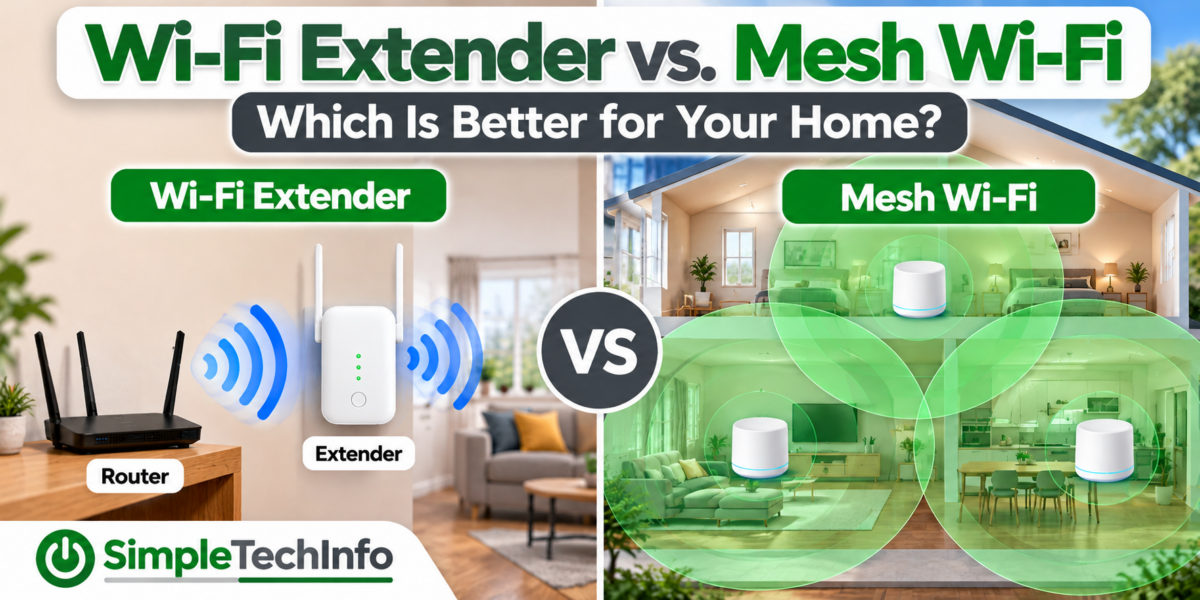
If your Wi-Fi works well near your router but becomes slow or unreliable in other parts of your home, you may need a way to improve your Wi-Fi coverage.
Two common solutions are Wi-Fi extenders and mesh Wi-Fi systems.
Both can help bring Wi-Fi to areas where the signal is weak, but they work differently. A Wi-Fi extender is usually the cheaper and simpler option, while a mesh system is designed to provide more consistent coverage throughout a larger area.
So which one should you use?
Let’s look at how each works and when one might be a better choice for your home.
First: Make Sure You Actually Need One
Before buying additional Wi-Fi equipment, check whether the problem might simply be your router’s location.
Wi-Fi signals can be weakened by:
- Walls and floors
- Long distances
- Metal objects
- Appliances
- Furniture
- Other wireless devices
- Placing the router inside a cabinet or closet
If possible, place your router in a central, elevated, and open location.
You can learn more in our guide on Where Should I Put My Wi-Fi Router?
If your router is already in a good location but you still have areas with poor coverage, an extender or mesh system may help.
What Is a Wi-Fi Extender?
A Wi-Fi extender is a device that receives your existing Wi-Fi signal and rebroadcasts it to increase its reach.
You typically plug the extender into an electrical outlet somewhere between your router and the area with weak Wi-Fi.
Think of it as a middleman.
Your router sends Wi-Fi to the extender, and the extender helps carry that connection farther into your home.
Wi-Fi Extenders Are Usually Best For:
- One or two rooms with weak Wi-Fi
- Smaller homes or apartments
- A basement, garage, or bedroom with poor coverage
- People looking for an inexpensive solution
- Situations where the existing router works well everywhere else
If you only have one troublesome area, an extender may be all you need.
Where Should You Put a Wi-Fi Extender?
Placement is extremely important.
A common mistake is putting the extender directly in the room where Wi-Fi doesn’t work.
Remember that the extender needs to receive a decent signal from your router before it can rebroadcast that signal.
For example, imagine your router is downstairs and your upstairs bedroom has poor Wi-Fi.
Putting the extender in the bedroom may not help if the router’s signal is already extremely weak there.
Instead, placing the extender somewhere between the router and bedroom may work better.
A good rule is:
Router → Extender → Weak Wi-Fi Area
Not:
Router → No Signal → Extender
If the extender can’t communicate reliably with the router, it can’t provide a good internet connection to your devices.
Advantages of a Wi-Fi Extender
Lower Cost
Wi-Fi extenders are generally an inexpensive way to address a small coverage problem.
You don’t have to replace your existing router.
Simple Setup
Many modern extenders are designed for basic home installation and can be configured through an app or web interface.
Good for One Problem Area
If your Wi-Fi is good throughout most of your house except for one room, an extender can be a practical solution.
Disadvantages of a Wi-Fi Extender
Extenders aren’t perfect.
Performance Can Be Lower
Traditional wireless extenders have to communicate with both your router and your devices.
Depending on the extender, router, wireless conditions, and how they’re connected, this can reduce the performance available to devices using the extender.
Placement Matters
Put the extender too far from the router and it receives a poor signal.
Put it too close to the router and you may not extend coverage far enough.
Finding the right location can take some experimenting.
You May Have Multiple Wi-Fi Networks
Some extenders create a separate Wi-Fi network.
For example, your router might broadcast:
MyWiFi
while the extender broadcasts:
MyWiFi_EXT
You may have to switch between them as you move around your house.
Some newer equipment handles this better, but the experience depends on the devices you’re using.
What Is Mesh Wi-Fi?
A mesh Wi-Fi system uses multiple Wi-Fi devices, often called nodes or points, placed throughout your home.
One mesh unit connects to your modem or internet connection and acts as the main router.
Additional mesh nodes communicate with the main unit and help distribute Wi-Fi throughout your home.
Instead of adding one extender to an existing router, you’re creating a coordinated Wi-Fi system designed to cover the entire home.
Mesh Wi-Fi Is Usually Best For:
- Larger homes
- Multi-story homes
- Several areas with weak Wi-Fi
- Homes where one router doesn’t provide enough coverage
- People who want a more seamless Wi-Fi experience
- Homes with many connected devices
Mesh systems are generally more expensive than a single extender, but they can provide a better solution when coverage problems exist throughout the house.
How Is Mesh Different From an Extender?
The biggest difference is how the devices work together.
A Wi-Fi extender usually takes the signal from your existing router and extends it into another area.
A mesh system consists of multiple units designed to operate together as one network.
Your phone, laptop, tablet, or other device can generally move around the house while the mesh system helps connect it to an appropriate mesh point.
Ideally, you don’t have to think about which access point you’re connected to.
Wi-Fi Extender vs. Mesh Wi-Fi
Here’s a simple comparison:
| Feature | Wi-Fi Extender | Mesh Wi-Fi |
|---|---|---|
| Cost | Usually lower | Usually higher |
| Best for | One or two weak areas | Whole-home coverage |
| Existing router | Usually keeps using it | Usually replaces router function |
| Setup | Usually simple | Usually app-guided |
| Multiple units | Possible | Designed for it |
| Moving around home | Can be less seamless | Usually more seamless |
| Large homes | Limited | Better suited |
| Expandability | Varies | Usually easy to add nodes |
| Performance | Depends heavily on placement | Generally designed for broader coverage |
Which One Should You Choose?
The easiest way to decide is to look at the size of your Wi-Fi problem.
Choose a Wi-Fi Extender If:
Your Wi-Fi works well throughout most of your home, but you have one specific area with a weak signal.
For example:
The router is downstairs, everything works fine, but the upstairs guest bedroom has weak Wi-Fi.
An extender may solve the problem without requiring you to replace your router.
Choose Mesh Wi-Fi If:
You have multiple areas with poor Wi-Fi or your home is too large for a single router to cover effectively.
For example:
Wi-Fi is weak upstairs, in the basement, and on the opposite side of the house.
At that point, installing multiple extenders can become complicated. A mesh system may provide a cleaner whole-home solution.
What About a Two-Story Home?
A mesh system can be especially useful in multi-story homes.
Wi-Fi has to travel through ceilings, floors, walls, furniture, and other obstacles as it moves between levels.
Instead of relying on one router to reach every floor, you can place mesh nodes in strategic locations around the home.
That doesn’t necessarily mean you need one node in every room or even one on every floor.
Start with the number recommended for the size and layout of your home and add another only if coverage remains poor.
Too many wireless access points placed too closely together can sometimes create unnecessary interference or other wireless complications.
Does Mesh Wi-Fi Make Your Internet Faster?
Not necessarily.
This is an important distinction.
Your internet speed is primarily determined by your internet service plan, modem or gateway, networking equipment, wireless conditions, and the capabilities of your devices.
A mesh system can’t turn a 300 Mbps internet plan into a 1 Gbps connection.
What it can do is help more of your home receive a stronger, more usable Wi-Fi connection.
For example, perhaps you get 300 Mbps near your router but only 20 Mbps in an upstairs bedroom because the Wi-Fi signal is weak.
Improving Wi-Fi coverage could significantly improve performance in that bedroom.
But the mesh system isn’t increasing the speed supplied by your internet provider. It’s helping your devices make better use of the connection you already have.
Does a Wi-Fi Extender Slow Down Your Internet?
It can reduce the speeds available through the extender, particularly when the extender uses the same wireless connection to communicate with both your router and your devices.
How much performance changes depends on factors such as:
- Extender design
- Wi-Fi standard
- Signal strength
- Distance from the router
- Interference
- Number of connected devices
- Whether a wired connection is available
For basic web browsing, email, and streaming, a properly placed extender may still provide more than enough performance.
The important thing is that the extender starts with a good connection to your router.
What Is Wired Backhaul?
If you’re comparing mesh systems, you may see the term wired backhaul.
Normally, mesh nodes communicate with one another wirelessly.
With wired backhaul, the mesh units are connected using Ethernet cables.
This can provide a fast and reliable connection between the mesh points because they don’t have to rely entirely on Wi-Fi to communicate with each other.
If your home already has Ethernet wiring, choosing a mesh system that supports wired backhaul can be especially useful.
However, Ethernet isn’t required for most mesh systems.
What Is Wireless Backhaul?
Wireless backhaul simply means the mesh nodes communicate with each other over Wi-Fi instead of Ethernet.
This makes installation much easier because you don’t have to run network cables through your home.
Some mesh systems also have dedicated wireless capacity for communication between nodes, while others share wireless capacity with connected devices.
What About Wi-Fi 6, Wi-Fi 6E, and Wi-Fi 7?
You’ll probably encounter different Wi-Fi generations when shopping for extenders or mesh systems.
Newer standards can provide improvements in speed, capacity, efficiency, and how well networks handle multiple devices.
However, buying the newest and most expensive Wi-Fi system isn’t always necessary.
Your devices also need to support newer Wi-Fi standards to take full advantage of their capabilities.
For a typical home, coverage, placement, reliability, and the capabilities you actually need are often more important than simply buying the product with the largest numbers on the box.
Can I Use an Extender With Any Router?
Many Wi-Fi extenders can work with routers from different manufacturers.
However, compatibility and available features can vary.
An extender from another manufacturer may provide basic Wi-Fi coverage but might not support all of the seamless roaming or management features available when using equipment designed to work together.
Check the manufacturer’s compatibility information before purchasing an extender.
Can I Add Mesh Wi-Fi to My Existing Router?
Sometimes, but it depends on the equipment.
Most consumer mesh systems are designed to take over the main Wi-Fi routing duties in your home.
In some configurations, you may be able to keep your existing modem/router gateway and place either the gateway or mesh system into a mode that prevents both devices from performing the same routing functions.
The exact setup varies significantly by internet provider and equipment.
If your modem and router are separate devices, replacing the existing router with a mesh system is often straightforward.
Extender or Mesh: A Simple Decision
If you’re still unsure, ask yourself this question:
Is my Wi-Fi problem limited to one area, or is coverage poor throughout my home?
If it’s one area, start by considering a Wi-Fi extender.
If it’s several areas, consider a mesh Wi-Fi system.
And if the problem is only a few feet from your router, don’t buy anything yet. Try improving your router placement first.
Quick Comparison
Consider a Wi-Fi extender when:
- You have one Wi-Fi dead zone.
- Your existing router works well elsewhere.
- You want the least expensive solution.
- You don’t want to replace your current router.
Consider mesh Wi-Fi when:
- You have several Wi-Fi dead zones.
- You have a larger or multi-story home.
- You want more consistent whole-home coverage.
- You’re willing to replace or reconfigure your existing router.
- You want a system that can be expanded with additional nodes.
Bottom Line
Wi-Fi extenders and mesh Wi-Fi systems can both improve wireless coverage, but they’re designed for different situations.
A Wi-Fi extender is often the better choice when your existing Wi-Fi works well and you simply need to reach one problem area.
A mesh Wi-Fi system is generally better when you need reliable coverage across a larger home or have several areas where your router’s signal doesn’t reach well.
Before buying either one, make sure your router is positioned properly and determine where your Wi-Fi signal actually becomes weak.
Fixing the placement of your existing equipment may cost nothing at all.
But if you still need more coverage, knowing whether you’re fixing one dead zone or a whole-home coverage problem will make choosing between an extender and mesh Wi-Fi much easier.